In modern software development, traceability between requirements and test cases is no longer optional; it’s essential. Whether you’re chasing regulatory compliance, shipping faster releases, or simply avoiding costly bugs, the ability to link every requirement to its corresponding tests can make or break a project. Yet most teams still struggle with fragmented tools, manual spreadsheets, and outdated links that break the moment a requirement changes.
Everia changes the game. As an all-in-one workspace for requirements, test cases, tasks, and documentation, Everia turns traceability from a painful chore into a seamless, intelligent process. In this guide, we’ll walk through exactly how Everia helps teams link test cases to requirements, and why the results are transformative.
The Real Pain of Disconnected Traceability
Traditional setups force teams to juggle Jira for requirements, TestRail or Excel for test cases, and Confluence for specs. Every time a product manager updates a requirement, someone has to manually hunt down related test cases and update them. Coverage reports become outdated overnight. During audits, teams scramble to prove that every feature was properly tested.
Every time a product manager updates a requirement, someone has to manually hunt down related test cases and update them. Coverage reports become outdated overnight. During audits, teams scramble to prove that every feature was properly tested.
The cost is real: wasted hours, missed defects, and finger-pointing in retrospectives. Studies show QA professionals lose 10–15 hours per week just maintaining traceability. That’s time stolen from actual testing and innovation.
Everia eliminates the disconnect by bringing everything into one living workspace, where requirements and test cases are natively, automatically, and intelligently linked.
Everia’s Unified Workspace: The Foundation for Perfect Linking
At the heart of Everia is a single source of truth. You no longer copy-paste requirements across tools. Everything lives together: user stories, acceptance criteria, test cases, and even supporting documents.
When you create or import a requirement, Everia immediately gives you the ability to attach test cases directly. The link works both ways:
Update the requirement → Everia flags any impacted test cases.
Update a test case → the requirement’s coverage percentage updates in real time.
No more version chaos. No more “Which document is the latest?”
Step-by-Step: How to Link Test Cases to Requirements in Everia
The process is designed to be fast and intuitive for both technical and non-technical users.
Create or import your requirement — Paste from Word, upload a PDF, or write it directly in Everia’s rich editor.
Let Everia’s AI scan the context — The built-in AI reads the requirement text and suggests existing test cases that might already cover it.
Link with one click — Drag and drop test cases, or use the “Link Test Case” button. You can link multiple tests to one requirement or one test to multiple requirements.
Automatic bidirectional sync — Any change propagates instantly across the platform.
View live coverage — Jump straight into the interactive traceability matrix.
Diagram 1: Everia Requirement-to-Test Case Linking Flow
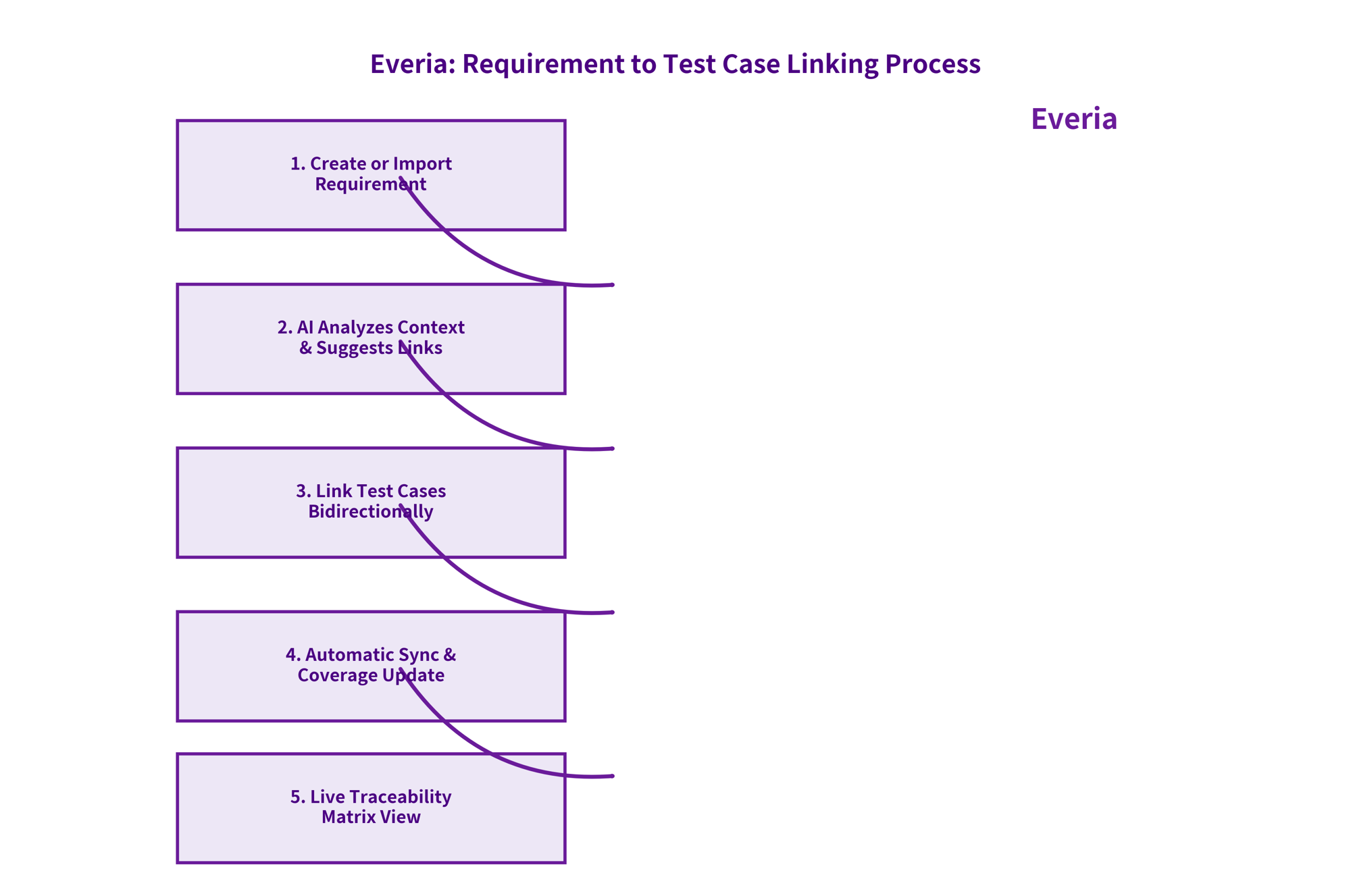
(The flowchart above shows the complete 5-step process with AI assistance and real-time sync.)
The Power of the Live Traceability Matrix
Once links are established, Everia’s traceability matrix becomes your command center. It’s not a static Excel sheet; it’s a dynamic, filterable view that updates the moment anything changes.
You can see at a glance:
Which requirements have full test coverage
Which ones are only partially covered
The last time any linked test case was executed
Overall project health metrics
Diagram 2: Sample Everia Traceability Matrix
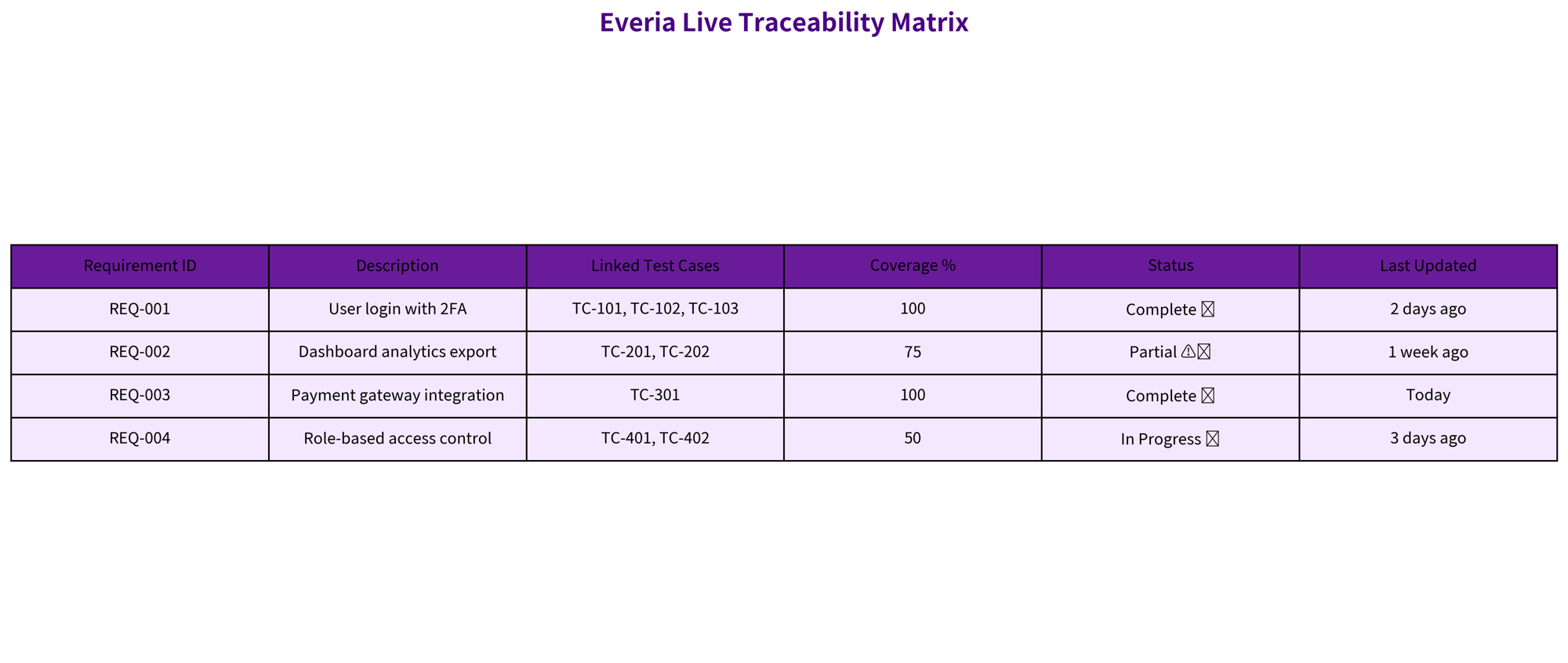
(The image above shows a real-time matrix with Requirement IDs, descriptions, linked test cases, coverage %, status, and last-updated timestamps.)
Teams love filtering by sprint, priority, or owner. Exporting a compliance-ready report takes seconds instead of hours.
AI That Actually Understands Your Documentation
What truly sets Everia apart is its intelligent AI layer. Unlike a simple keyword search, Everia’s AI is trained to understand your product’s language.
Upload old requirements or past test runs, and the AI can:
Auto-suggest links between new requirements and historical test cases
Draft new test cases based on similar requirements from previous sprints
Highlight gaps (“This requirement has zero linked tests”)
Alert you when a requirement change reduces coverage below your threshold
This means even legacy projects can achieve full traceability without months of manual cleanup.
Real-World Benefits Teams Are Seeing
Teams using Everia report:
50% less time spent on traceability maintenance
100% visibility into test coverage before every release
Fewer production bugs because nothing slips through untested
Faster audits and compliance sign-offs
Happier developers and QA engineers who spend time testing instead of hunting for documents
Product managers love the transparency. Executives get instant dashboard views showing true release readiness. And QA leads finally have data-backed proof that every requirement is covered.
Ready to Retire the Traceability Nightmare?
Linking test cases to requirements doesn’t have to be a weekly headache. With Everia’s unified workspace, bidirectional links, live traceability matrix, and context-aware AI, you get complete visibility without the manual work.
Whether you’re a fast-growing startup shipping weekly or an enterprise team managing complex compliance, Everia makes traceability effortless, so you can focus on building great software.
Try it free today at everia.io and see how quickly your team can move from “Where’s the test for this?” to “Coverage is 100%, let’s ship.”