You've made the call. Your team is leaving Jira.
Then someone asks the question that stalls every Jira migration: "Okay, but how do we actually move everything without breaking the sprint?"
In Part 1, we covered the why: Atlassian's cloud-only future, Europe's push for digital sovereignty, and what a European alternative needs to deliver. Part 2 is the how. You'll see what daily work looks like in Everia, and you'll get a five-step Jira migration playbook you can start this week.
What a Jira Migration Really Involves
Most teams think a Jira migration is a data problem. Export the tickets, import the tickets, done.
In practice, you're moving three things at once:
• Data. Backlogs, epics, sprints, attachments and links.
• Process. Workflows, statuses and the unwritten rules your team built around them.
• Habits. Where people look for specs, where QA logs results, where time gets tracked.
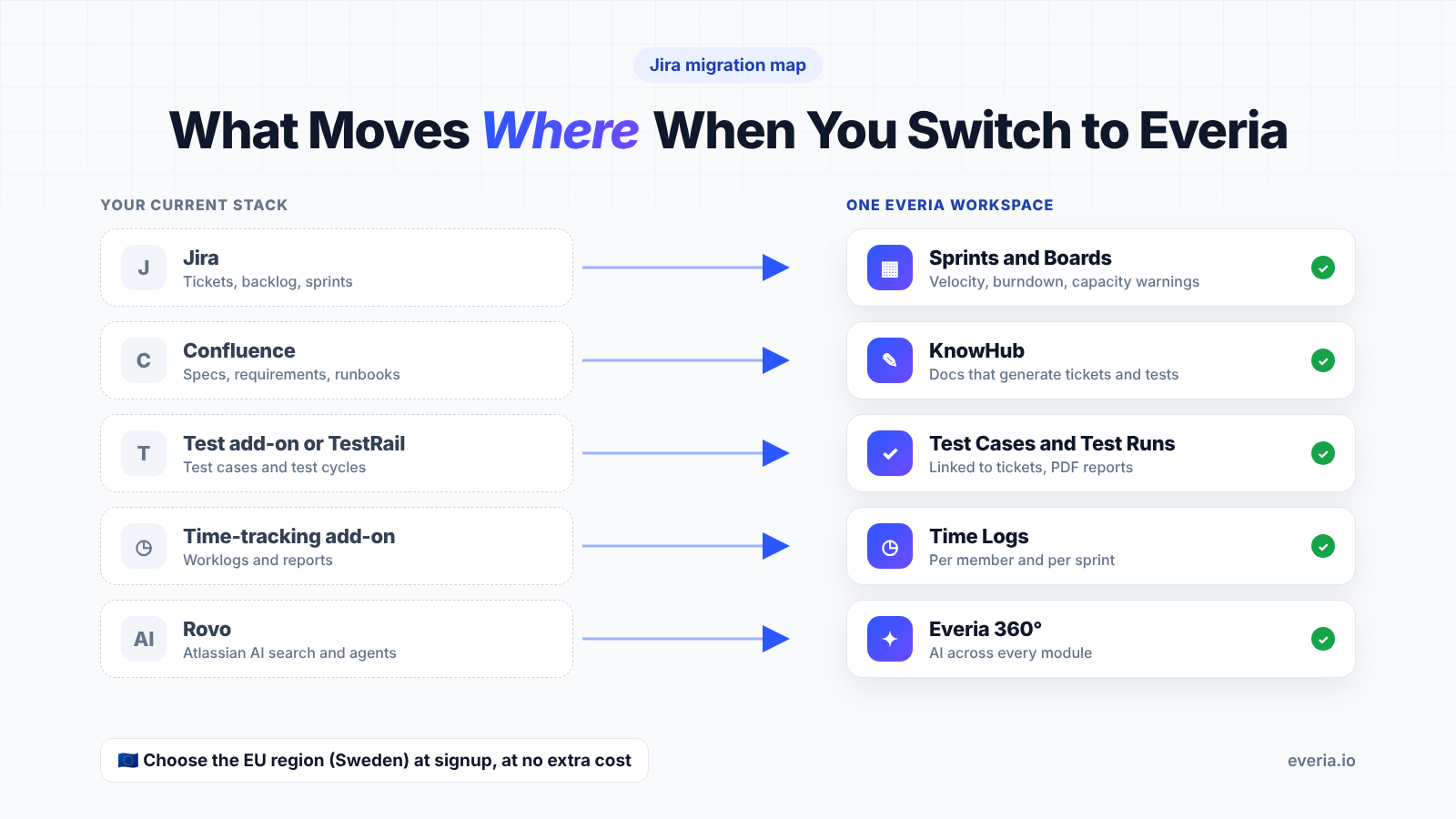
If your stack is Jira plus Confluence plus a test tool plus a time tracker, your Jira migration is really four migrations. That sounds worse than it is. With Everia, all four land in the same workspace, so you only have to change habits once.
A Day in Everia: What Your Team Uses After the Jira Migration
Before you plan the move, it helps to picture where you're moving to. Here's what a normal sprint looks like once the Jira migration is done.
Sprints and Boards
Every project starts from a template. The Software Engineering template sets up a Backlog → In Dev → In QA → Done board with Story, Feature and Task ticket types. Not a fit? Rename columns, colours and ticket types anytime from Settings.
From there, it's familiar ground: Kanban and list views, sprint planning, velocity and burndown charts. The difference is what Everia notices for you. It flags overloaded team members and at-risk milestones before they derail a sprint.
Test Cases and Test Runs
This is where most Jira setups need a paid add-on, and where a Jira migration pays off fastest. In Everia, it's built in.
QA engineers write test cases with steps and expected results, organise them into folders, and import or export in bulk via Excel. Test runs let you assign cases to teammates and mark results as Pass, Fail, Blocked, Retest or Skip. Attach screenshots, then generate a PDF report for your release review.
Because tests link straight to tickets and requirements, developers and QA see the same picture. No more copying bug IDs between tools.
Nexus
Nexus replaces the Confluence half of your stack, so docs move in the same Jira migration as tickets. Write requirements, specs and runbooks in rich text, then let Everia generate tickets and test cases from them. Every ticket keeps a link back to the document it came from, so traceability comes for free.
GitHub and GitLab Sync
Connect your repository and let the code update the board. Commits that reference a ticket link to it automatically. When a pull request is opened or merged, Everia moves the related ticket along. Your developers stop updating statuses by hand. It's one of the first things teams connect after a Jira migration.
Everia 360°
Everia 360° is the AI layer across every module. Ask it which tickets are blocked, which tests failed in the last run, or whether a feature is ready to ship. It can draft tickets and test cases from user stories, and it works with your permissions, asking for confirmation before anything destructive.
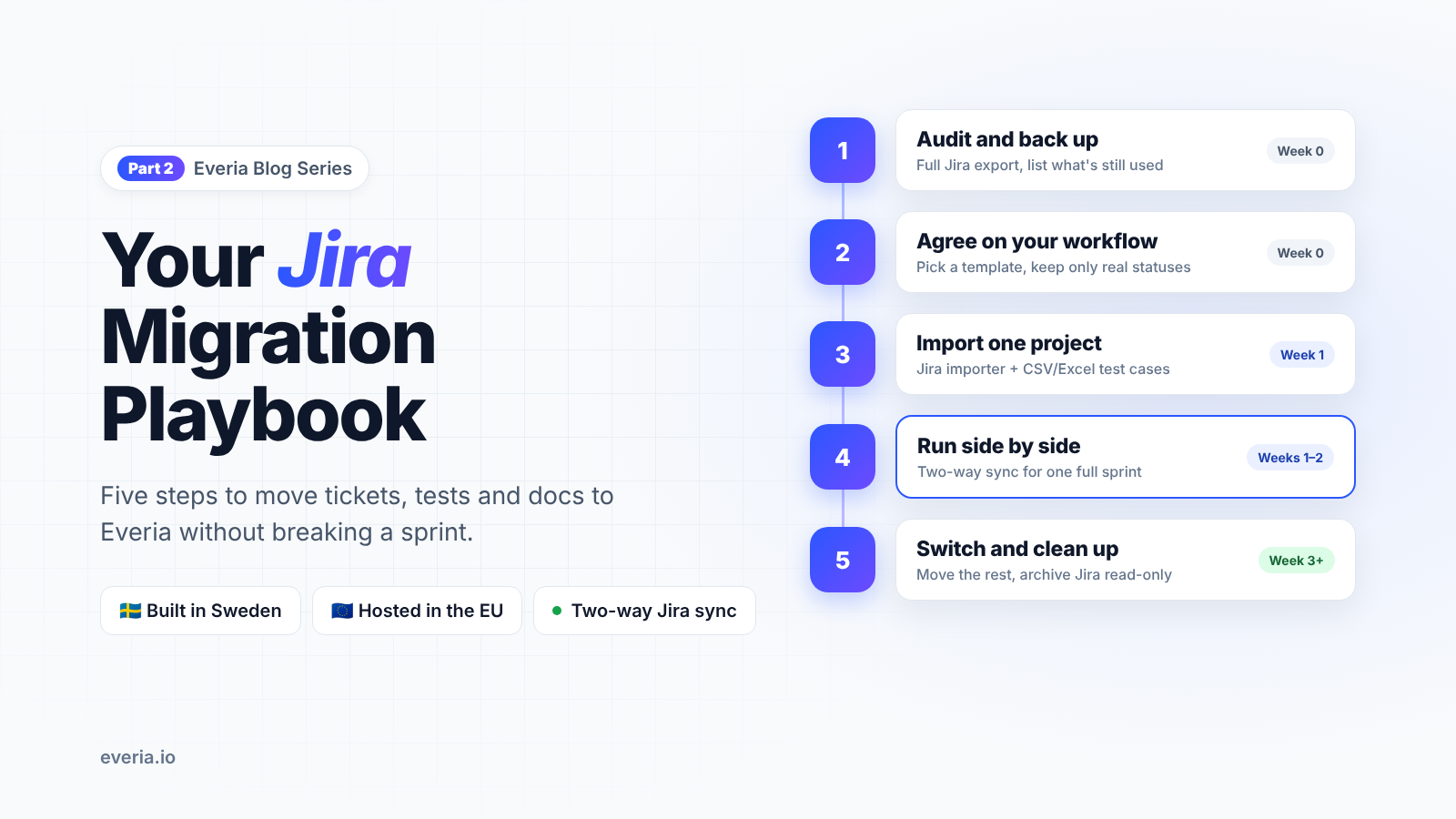
The 5-Step Jira Migration Playbook
Here's the approach we recommend to every team that moves to Everia. It's built around one rule: never bet the whole quarter on a single cutover weekend.
Step 1: Audit and Back Up Before You Touch Anything
Start with a full Jira export of every project you plan to move, and keep it somewhere safe. This is your safety net.
Then audit. List your active projects, custom fields, workflows and integrations. Be honest about what's still used. A Jira migration is the best excuse you'll ever get to leave five years of closed tickets and abandoned fields behind.
Step 2: Agree on Your Workflow First
Statuses rarely map one-to-one between tools. If Jira has eleven statuses and your team really uses four, don't rebuild all eleven.
Pick the Everia template closest to how you work today, then agree on the new flow with developers, QA and product before you import. Ten minutes of agreement here saves weeks of confusion later.
Step 3: Import One Active Project
Don't move everything at once. Choose one active project with a real sprint in progress and use Everia's Jira importer to bring the backlog across.
If your test cases live in a spreadsheet or another test tool, import them via CSV or Excel. Then check the essentials: custom fields, attachments and links should all have survived the Jira migration intact.
Step 4: Run Both Tools Side by Side
This is the step most Jira migration plans skip, and it's the one that removes the risk. Everia's two-way Jira sync keeps both tools in step while your pilot team works in Everia. Anyone still in Jira sees the same tickets.
Run the pilot for about two weeks, or one full sprint. Watch where people get stuck, and adjust the workflow before you scale.
Step 5: Switch Over, Then Clean Up
Once the pilot team is comfortable, finish the Jira migration by moving the remaining projects in batches. Connect GitHub or GitLab, invite stakeholders as free viewers, and set up your test runs.
Finally, archive Jira as read-only for reference and keep your export backup. Your Jira migration is complete when nobody needs to open the old tool for a full sprint.
Your Jira Migration Checklist for the First Two Weeks
In Part 1, we promised a list of what to check so nothing gets lost in the move. Here it is:
• Every active ticket has the right status, owner and sprint.
• Custom fields you kept show the correct values.
• Attachments open and ticket links point to the right place.
• Test cases are linked to the tickets and requirements they verify.
• Repository activity is updating tickets automatically.
• Stakeholders can see progress without asking for status updates.
• Your team can answer "where does X live now?" without guessing.
If you can tick every box, your Jira migration is in good shape.
Common Jira Migration Mistakes to Avoid
Most teams that struggle with a Jira migration make one of these five mistakes.
Migrating everything. Old, closed work clutters the new tool. Keep it in the backup instead.
Copying Jira's complexity. If you rebuild every scheme and screen, you'll recreate the problem you were trying to escape.
Leaving QA out of the plan. Testers often have the most tool-specific habits. Involve them from Step 2.
No clear owner. Every successful Jira migration has one person who makes final calls on fields and workflows.
A big-bang cutover. Switching all projects on one Monday is how sprints break. Pilot first.
Why Everia Makes the Move Easier for European Teams
A Jira migration is also a chance to fix where your data lives. When you create your Everia workspace, you can choose the EU region (Sweden) at signup, at the same price as the global region. That means your imported data lands in the EU from day one, covered by Everia's published Data Processing Agreement.
The two-month free trial covers up to three members and one project, which is exactly the size of a pilot. After that, the Team plan is €12 per member per month, with every module included and no minimum seats. See the details on our pricing page, or compare both tools side by side in Everia vs Jira.
And if you're on Jira Data Center, the clock is already running. Atlassian has said its Data Center products reach end of life on March 28, 2029. Starting your Jira migration now gives you time to do it calmly.
Frequently Asked Questions
1. How long does a Jira migration take?
It depends on how many projects and custom fields you have. For most product teams, a sensible plan is a two-week pilot on one project, followed by moving the remaining projects in batches.
2. Can we keep using Jira during the Jira migration?
Yes. Everia's two-way Jira sync lets both tools run side by side, so part of your team can keep working in Jira while the pilot team works in Everia.
3. Will our test cases come across?
Yes. Everia supports importing test cases from CSV and Excel files and from other popular test management tools, and the support team can help with the process.
4. Can Everia import from tools other than Jira?
Yes. Everia also offers importers for Linear, ClickUp and Asana.
Ready to Start Your Jira Migration?
Less complexity. Better collaboration. Faster shipping. Pick one project, run one sprint in Everia, and see the difference before you commit.
Start your free two-month trial and begin your Jira migration with a pilot, not a leap.
Written by the Everia team.